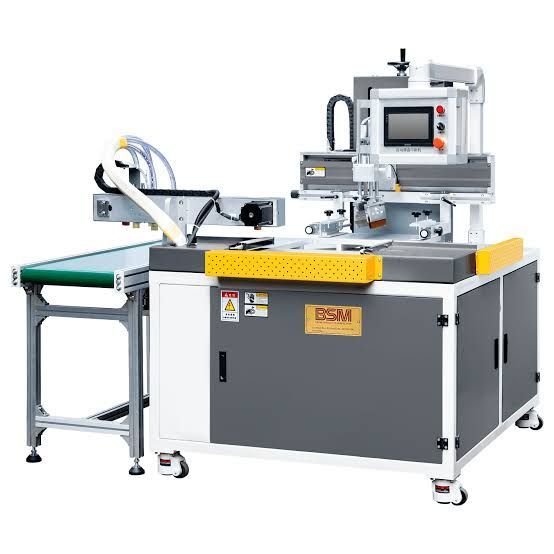
How Screen Printing Equipment Works: A Step-by-Step Guide
Screen printing equipment is used to transfer ink through a prepared mesh screen onto a wide range of surfaces and materials.
The technology is used for graphics, labels, industrial markings, textiles, product decoration, signage, electronics, and other specialized applications.
A typical screen printing setup combines a screen, stencil, squeegee, printing surface, ink system, and curing equipment. Industrial systems can also include automated material handling, registration controls, drying units, and inspection technologies to support consistent production.
Why Screen Printing Equipment Matters
Screen printing can produce relatively thick and durable ink layers compared with some other printing methods. This characteristic makes it useful for applications where printed graphics or functional layers need to remain visible and stable during handling or environmental exposure.
Depending on the configuration, industrial screen printing equipment can support:
- Flat and selected three-dimensional surfaces
- Multiple-color printing
- Large-area graphics
- Durable printed layers
- Product identification
- Decorative printing
- Textile printing
- Specialized functional printing
The final result depends on factors such as mesh selection, stencil quality, ink characteristics, squeegee settings, substrate condition, and curing.
Main Components of Screen Printing Equipment
A screen printing system contains several components that work together during the printing process.
| Component | Primary Function |
|---|---|
| Screen frame | Supports the mesh |
| Mesh | Controls ink transfer |
| Stencil | Defines the printed image |
| Squeegee | Forces ink through open mesh areas |
| Printing bed | Supports the substrate |
| Registration system | Aligns the print |
| Ink system | Supplies printing material |
| Drying or curing unit | Stabilizes the printed layer |
Screen and Mesh
The screen consists of a frame with a tightly stretched mesh. The mesh contains open and blocked areas created by the stencil.
Open areas allow ink to pass through, while blocked areas prevent ink transfer. Mesh count, thread characteristics, and tension can influence the amount of ink deposited and the level of detail that can be reproduced.
Stencil
The stencil creates the image pattern on the screen. It determines which sections of the mesh remain open for ink transfer.
Accurate stencil preparation is important for producing clean edges and consistent graphics.
Squeegee
The squeegee moves across the screen while applying controlled pressure. This forces ink through the open mesh areas and onto the substrate.
Squeegee pressure, angle, speed, and hardness can affect ink coverage and print consistency.
Printing Bed
The printing bed supports the substrate during printing. Depending on the equipment, the bed may be stationary, vacuum-assisted, or integrated into an automated handling system.
How Screen Printing Equipment Works
The screen printing process generally follows several controlled stages.
1. Artwork Preparation
The desired artwork, text, graphic, or pattern is prepared digitally or through an appropriate prepress process.
The design is then converted into a format suitable for stencil production.
2. Screen Preparation
The mesh screen is coated with a light-sensitive emulsion or another stencil-forming material.
The image is transferred onto the screen, creating areas where ink can pass through. After processing, the screen is inspected and prepared for printing.
3. Substrate Preparation
The material receiving the print must be clean and suitable for the selected ink.
Depending on the application, the substrate may be paper, textile, plastic, glass, metal, ceramic, wood, or another material.
Surface preparation can include cleaning, treatment, or other processes designed to improve ink adhesion.
4. Screen Registration
For multi-color printing, each screen must be aligned accurately with the substrate and other screens.
Proper registration helps ensure that individual colors line up correctly and that the finished image appears sharp.
5. Ink Application
Ink is placed onto the screen above the stencil area.
The squeegee is then moved across the screen with controlled pressure. Ink passes through the open mesh areas and transfers onto the substrate.
6. Screen Separation
After the squeegee passes across the printing area, the screen separates from the substrate.
The printed ink layer remains on the surface while the screen returns to its printing position.
7. Drying or Curing
The printed material may require drying or curing depending on the ink technology.
Drying can involve air circulation or heat, while some specialized inks may require ultraviolet or other curing technologies.
Proper curing helps establish the required adhesion, hardness, durability, and surface characteristics.
Types of Screen Printing Equipment
Different equipment configurations are available for different production requirements.
Manual Screen Printing Equipment
Manual systems require operators to position substrates, operate the screen, apply the squeegee, and move finished pieces.
They can provide flexibility for smaller production environments and applications involving frequent product changes.
Semi-Automatic Screen Printing Machines
Semi-automatic systems combine operator involvement with mechanical control of selected printing functions.
They can improve consistency while retaining flexibility for different products and substrates.
Automatic Screen Printing Equipment
Automatic systems can integrate substrate feeding, screen movement, squeegee operation, registration, and curing.
They are generally suited to higher-volume production where repeatability and process control are important.
Rotary Screen Printing Equipment
Rotary systems use cylindrical screens to apply continuous patterns or designs. They can be suitable for textiles, packaging materials, and continuous web applications.
Industrial Applications of Screen Printing Equipment
Screen printing technology is used across numerous industries.
Electronics
Specialized screen printing processes can deposit conductive, insulating, or protective materials onto selected components and substrates.
Textiles
Screen printing is widely used for applying graphics and patterns to fabrics and garments.
Glass and Ceramics
Specialized inks can be screen printed onto glass and ceramic surfaces for decorative or functional applications.
Automotive Components
Manufacturers can use screen printing for markings, graphics, control-panel elements, and selected decorative applications.
Signage and Graphics
Screen printing can produce durable graphics for signs, panels, displays, and other visual applications.
Industrial Products
Screen printing can be used for product identification, control panels, equipment markings, and specialized surface graphics.
Factors Affecting Screen Printing Quality
Several variables can influence the final print.
Mesh selection affects ink deposit and image detail. A finer mesh may support greater detail, while other mesh configurations can provide heavier ink coverage.
Stencil quality influences image edges and consistency. Poor stencil preparation can result in uneven or distorted graphics.
Squeegee settings affect how ink passes through the mesh. Pressure, angle, speed, and blade condition should be controlled according to the application.
Ink characteristics influence adhesion, opacity, drying, and durability.
Substrate condition also matters. Contamination, surface energy, texture, and material composition can influence the final result.
Automation in Modern Screen Printing
Modern screen printing equipment can incorporate automated controls for substrate feeding, registration, screen movement, squeegee operation, curing, and inspection.
Automated registration systems can align the substrate and screen before printing. Sensors can also detect substrate position and coordinate printing cycles.
Vision inspection systems may be integrated into production lines to identify missing areas, registration errors, contamination, or other defects.
Best Practices for Screen Printing
Consistent screen printing requires control over equipment, materials, and operating conditions.
Useful practices include:
- Select the appropriate mesh for the application.
- Maintain consistent screen tension.
- Prepare stencils accurately.
- Use compatible inks and substrates.
- Maintain consistent squeegee pressure.
- Control squeegee speed and angle.
- Keep screens and equipment clean.
- Verify multi-color registration.
- Monitor drying or curing conditions.
- Inspect finished prints regularly.
Regular maintenance and process monitoring can help reduce printing defects and maintain consistent output.
Screen Printing vs. Digital Printing
Screen and digital printing use different image-transfer approaches.
| Feature | Screen Printing | Digital Printing |
|---|---|---|
| Printing method | Stencil and mesh | Digital printheads |
| Physical screen | Required | Generally not required |
| Ink layer | Can be relatively thick | Usually controlled through droplets |
| Variable data | More limited | Highly suitable |
| Setup | Screen preparation required | Digital file preparation |
| Suitable applications | Durable graphics, specialty layers | Variable graphics and data |
The appropriate method depends on the substrate, print requirements, production volume, image characteristics, and desired workflow.
Frequently Asked Questions
What is screen printing equipment?
Screen printing equipment includes machines and tools used to transfer ink through a mesh screen and stencil onto a substrate. Common components include screens, squeegees, printing beds, registration systems, and curing equipment.
How does a screen printing machine work?
A stencil creates open areas in a mesh screen. Ink is placed on the screen, and a squeegee pushes the ink through the open mesh onto the substrate.
What materials can be screen printed?
Screen printing can be used on textiles, paper, plastic, glass, metal, ceramics, wood, and various specialized materials, depending on the ink and equipment.
What affects screen printing quality?
Mesh selection, stencil quality, ink properties, squeegee pressure, printing speed, substrate preparation, registration, and curing conditions can all affect print quality.
What is automatic screen printing equipment?
Automatic screen printing equipment uses mechanical or computerized systems to perform functions such as substrate feeding, screen movement, printing, registration, and curing with reduced manual intervention.
Conclusion
Screen printing equipment uses a mesh screen, stencil, ink, and squeegee to transfer controlled layers of printing material onto a substrate. The process can be performed manually or integrated into automated production systems depending on the required throughput and level of process control.
From textiles and electronics to glass, ceramics, signage, and industrial components, screen printing remains useful for applications requiring durable and controlled printed layers. Selecting the right screen, ink, squeegee, curing system, and automation level is essential for achieving consistent results.